This article reflects my hands-on testing from January 2026, when Ubuntu/Mint with kernel 6.8, NVIDIA 470.256.02, and legacy DXVK provided a working gaming setup on my Dell Inspiron 7537 (GT 750M).
Since then, Ubuntu has retired its normal NVIDIA 470 packages in favor of transitional packages that may pull in newer drivers incompatible with Kepler. Meanwhile, community-maintained patches have made it possible to build R470 on much newer kernels, and Mesa’s NVK/NAK support for Kepler has progressed significantly.
The original testing results are preserved below for reference, but some installation advice and compatibility conclusions no longer reflect the current Linux ecosystem. Please read the dated notes throughout this article, and avoid following the linked installation guide without reviewing its update warning.
I’m investigating the changes and plan to document the newer approaches separately once I’ve tested them on the same hardware.
Older NVIDIA GPUs like the NVIDIA GeForce GT 750M were once popular pick-ups for budget gaming laptops, and many of us still use them on Linux today. But as Linux distributions such as Ubuntu 24.04 LTS and Linux Mint 22.x / 23.x have evolved, support for this hardware has become increasingly tricky, especially if your workflow involves gaming through Wine/Proton, Vulkan, or DXVK.
Let’s break this all down clearly!
What Is Kepler — and Why It Still Matters in 2026
The GeForce GT 750M is built on NVIDIA’s Kepler architecture (GK107), a GPU generation that powered most legendary GeForce 600/700 series cards. From a hardware standpoint, Kepler isn’t completely obsolete: these GPUs can handle OpenGL 4.6 and support Vulkan 1.2 with the right driver. On paper, that should be enough for a decent Linux gaming experience and/or modern applications.
If you own a GT 750M, you’re part of a large family of “Kepler survivors” that share the same GK107/GK104 architecture. If you’re rocking any of the GPUs listed below, this guide applies to you as well:
| GPU Generation | Popular Models (GK107/GK104) | Support Level (2026) |
| Mobile | GT 640M, GT 650M, GT 750M, GTX 765M | Legacy (Driver 470.xxx) |
| Desktop | GTX 660, 670, 680 | Legacy / NVK (Experimental) |
| Desktop | GTX 760, 770, 780 | Legacy / NVK (Experimental) |
In reality, the problem isn’t the silicon — it’s the “software wall.”
The reason the proprietary driver has been so important comes down to one simple word: performance. In my original testing, NVIDIA’s official 470 driver branch was the most reliable way to get my GT 750M running at its intended performance clocks without additional tweaking. Nouveau does support manual reclocking on Kepler, but getting comparable results isn’t necessarily as straightforward. And with NVK/NAK continuing to improve, the performance gap is worth revisiting rather than taking for granted.
NVIDIA has officially ended Linux driver development for Kepler GPUs. The 470.xxx driver branch is the last proprietary driver series that supports Kepler, and it has been declared end-of-life. There are no newer proprietary drivers (e.g., 510, 525, 535, 550, etc.) that support Kepler-based GPUs, and NVIDIA is no longer improving Vulkan, OpenGL, or kernel compatibility for this architecture.
That means if you’re running a GT 750M today, NVIDIA 470 is the end of the road, and everything moving forward depends on that legacy package.
The GTX 750 and 750 Ti exception
One of the most common points of confusion around Kepler-era GPUs is the GTX 750 Ti. Despite being labeled as part of the “700 series,” it isn’t actually a Kepler card at all. The GTX 750 Ti is built on first-generation Maxwell, which is exactly why it continues to receive support from newer NVIDIA driver branches long after Kepler was officially dropped.
To put simply:
- Most GeForce 600- and 700-series GPUs are Kepler, and that means they’re effectively locked to the 470 driver.
- GTX 750 and 750 Ti, on the other hand, are Maxwell, and remain compatible with modern NVIDIA drivers.
The GT 750M, unfortunately, falls squarely into the first category.
That said, there is a small glimmer of hope on the horizon. With the rise of NVK — Mesa’s new open-source Vulkan driver — Kepler users may eventually have a path forward that doesn’t rely on NVIDIA’s aging proprietary stack. For now, though, support for GK107 hardware is still very much a work in progress. We’ll come back to this later.
Kepler support has progressed further than described here. Mesa 25.2 introduced Vulkan 1.2-conformant NVK support for Kepler, with NAK as the default shader compiler. Nouveau also supports manual reclocking on Kepler, although its power and clock management differs from NVIDIA’s proprietary driver.
This makes Nouveau + NVK a genuine alternative worth testing, rather than merely a future possibility. However, Kepler remains limited to Vulkan 1.2, and better gaming performance than R470 is not guaranteed. I’ll compare the two stacks on my GT 750M before making any performance recommendations.
What this means in practice
You can still get basic hardware acceleration, OpenGL, and Vulkan 1.2 working on Linux with a Kepler GPU. However, Vulkan support is permanently capped at version 1.2 on the legacy 470 driver, with no path to Vulkan 1.3 or newer as seen on modern NVIDIA GPUs. As a result, you’re stuck on old driver tech, while the rest of the Linux graphics stack — kernels, Mesa, Wayland, Wine/Proton, DXVK — continues to move forward.
The implication is pretty clear: Kepler GPUs aren’t instantly unusable on Linux, but every new distro release makes compatibility more fragile, especially for modern games and Windows-to-Linux translation layers.
Kernel Compatibility: Big Headache with Ubuntu 24.04 / Mint 22
Modern Ubuntu (24.04 LTS) and its derivatives like Linux Mint generally ship with Hardware Enablement (HWE) kernels — the rolling series of newer kernels backported into the LTS lifecycle. In Ubuntu 24.04’s case, that means the system will progressively move into kernel 6.14+ as point releases roll out.
Here’s where the problem starts for legacy NVIDIA drivers:
NVIDIA 470 fails to build with newer HWE kernels like 6.14
The NVIDIA 470 driver branch — the last proprietary NVIDIA driver that supports Kepler GPUs like the GT 750M — includes kernel modules that are not compatible with newer HWE kernels around 6.14 and above. On current Ubuntu 24.04 point releases, attempting to build the 470 DKMS modules against a 6.14 HWE kernel will fail during compilation and prevent the driver from loading properly.
What this looks like in practice:
- The
nvidia-dkms-470package tries to compile its kernel module against the running HWE kernel but errors out, leaving the proprietary driver uninstalled or in a broken state. - Without a working proprietary driver, the system often falls back to nouveau or software rendering, which significantly reduces performance for gaming or GPU-accelerated workflows.
Workarounds people use
Because Ubuntu doesn’t plan to patch 470 to build cleanly with newer HWE kernels, the two common approaches in the community are:
- Boot or lock into an older kernel (like 6.8) that still compiles the 470 driver successfully and stick with it for the life of Ubuntu 24.04.
- Use unofficial patched packages or PPAs that attempt to fix the build for HWE kernels, though these are third-party and can be unstable or even break your display.
Kernel 6.8 was the known-good option for the stock NVIDIA 470 packages I tested in January 2026, not an absolute technical limit of R470.
Community-maintained patches, including those in joanbm’s nvidia-470xx-linux-mainline repository, now allow the legacy driver to build on much newer kernels. These patches are unofficial and require additional maintenance; their availability does not mean every kernel, distribution or laptop configuration will work automatically.
Ubuntu’s subsequent package transition is a separate issue: selecting kernel 6.8 alone no longer guarantees that installing nvidia-driver-470 will install the original R470 driver stack.
The Open Source Hope: Nouveau and NVK
If the proprietary NVIDIA 470 driver is such a headache to maintain on modern kernels, you might wonder: “Can I just use the built-in open-source drivers?”
Well, in 2026, the answer is a bit of a “double-edged sword”:
- Nouveau (The Classic): It will work out of the box and boot your system easily. However, for a GT 750M, Nouveau still struggles with reclocking. This means your GPU might stay stuck at its lowest power state, making even basic 3D games feel like a slideshow.
- NVK (The New Contender): This is the modern Vulkan driver for NVIDIA hardware inside the Mesa stack. While it’s making huge strides in supporting Vulkan 1.3 on older hardware, on a Kepler chip like the GT 750M, it’s still not as “plug-and-play” as the proprietary driver for gaming.
My experience
If your system lands on a 6.14 HWE kernel (the default on newer 24.04 point releases) and you’re relying on the NVIDIA 470 driver for your GT 750M, there’s a high chance the driver will fail to install or load properly unless you deliberately downgrade to — or hold — an older kernel that still works with 470, such as 6.8.0-90-generic.
6.8.0-060800 mainline build is not maintained through Ubuntu’s normal security update process. It should not be confused with Ubuntu’s packaged 6.8 generic kernels.
I go through this entire setup in a separate, step-by-step guide, based strictly on my own experience getting the GT 750M running reliably on Linux Mint 22.2 (and Ubuntu 24.04 LTS), covering kernel downgrades, driver locking, and validating the correct NVIDIA PRIME configuration on hybrid-graphics laptops. You can do just the same with Mint 22.3 and/or later point releases as well.
Verdict for 2026: For daily desktop use and Wayland stability, the open-source stack is becoming a viable fallback. But for gaming, sticking to the Proprietary 470 + Kernel 6.8 combo (as discussed below) remains the only way to get 100% performance out of the silicon.
My takeaway from January 2026: For my particular GT 750M, the proprietary NVIDIA 470 + kernel 6.8 combination was the most stable and reliable gaming setup I could reproduce. It remains my original performance baseline, but newer community patches and the progress made by Nouveau/NVK mean there are now other options worth testing. I’ll need some proper side-by-side benchmarks before drawing any conclusions about which performs better today.
Vulkan, DXVK and Wine/Proton Compatibility
When attempting to run Windows games on Linux, most of us lean on a stack of compatibility layers:
- Wine — the compatibility layer that lets Windows applications run on Linux
- DXVK — translates Direct3D calls (DirectX 9/10/11) into Vulkan
- Proton — Valve’s tailored/optimized Wine build with built-in DXVK for Steam gaming
And since you’re on an older NVIDIA Kepler GPU like the GT 750M, things get noticeably more complicated here, mostly because the software ecosystem has moved past the hardware’s capabilities.
DXVK’s Vulkan Requirements Have Moved On
Yes, DXVK itself continues to evolve. Modern releases — including all of the 2.x branch — now require a Vulkan driver with full Vulkan 1.3 support in order to run correctly. This isn’t just about performance; it’s about required Vulkan features and extensions that the translation layer depends on at runtime.
Unfortunately:
- Kepler GPUs on the last NVIDIA 470 driver only expose Vulkan 1.2, and they never get Vulkan 1.3 because NVIDIA dropped driver support after 470.
- That means recent DXVK builds (2.7+) won’t run on this hardware, since they expect features and extensions that simply aren’t available.
In short: the default DXVK that Proton and Wine ships today assumes newer Vulkan drivers than what Kepler is capable of.
What Gamers Using Old GPUs Actually Do
Realistically, modern DXVK releases (2.x) have moved on to requiring Vulkan 1.3-capable drivers — something Kepler GPUs on the NVIDIA 470 series simply can’t provide. As a result, if you stick with the default DXVK bundled in newer Proton or Wine setups, it often won’t initialize on hardware limited to Vulkan 1.2.
To work around that, many people with older GPUs downgrade their compatibility stack rather than expecting bleeding-edge builds to run — but to be honest, I’m not sure there’s a single “official” community consensus on the best version for everyone.
From my own experience, though, the most compatible version I’ve found for this hardware is DXVK 1.7.3 (or similar legacy branches). These older builds target the Vulkan 1.1–1.2 feature set that the 470 driver actually supports, and crucially they come with the setup_dxvk.sh script, which lets you install that specific DXVK version into a Wine prefix — making it familiar and relatively easy to use on older setups.
This doesn’t magically make your GPU modern, but it essentially lets Wine or Proton fall back to a translation layer whose expectations actually match what your GPU’s Vulkan support can deliver.
DXVK 1.7.3 was a known-good choice from my original testing, not the result of a controlled benchmark proving it performs better than 1.10.3.
DXVK’s upstream documentation identifies 1.10.3 as the legacy release suitable for older Vulkan drivers, with NVIDIA 470.82 as its minimum requirement. It also includes setup_dxvk.sh, so that installation convenience is not exclusive to 1.7.3.
For Kepler with proprietary R470, DXVK 1.10.3 is the more appropriate starting point. Version 1.7.3 remains a possible fallback for individual games or configurations that behave better with it. Compatibility on Nouveau/NVK should be tested separately.
TL;DR — What This Really Means for Kepler Gaming
To keep it simple:
- Modern DXVK ≈ Vulkan 1.3 minimum → Not possible on Kepler + 470.
- Legacy DXVK (1.10.x / 1.7.x / older) works best because it targets Vulkan 1.1–1.2 feature sets.
- You’ll likely need to manually manage DXVK versions in your Wine/Proton setup (e.g., via
setup_dxvk.shor custom Proton builds) to get the best compatibility on a GT 750M.
A Quick Note on Proton and Steam Play
If you’re planning to run Windows games via Steam on Linux with Proton’s compatibility layers, there’s one practical trick I’ve noticed works surprisingly well on older GPU setups:
Choosing Proton 7.0-6 as your default compatibility tool can let you launch a surprising number of Windows-only games — including titles like The Witcher 3, GTA V, and even Genshin Impact if you set it up through Steam properly. This works because older Proton releases bundle earlier DXVK builds that don’t require Vulkan 1.3, so they’re more likely to run on hardware capped at Vulkan 1.2.
That isn’t a silver bullet for every game, but in contrast to the latest Proton builds that bundle DXVK 2.x / Vulkan 1.3 features, Proton 7.x can be a functional bridge for older NVIDIA hardware and gives you a better chance of getting mainstream titles to launch on Linux.
For Genshin Impact specifically, community reports show that forcing Proton 7.0-6 in the game’s Compatibility settings often gets the launcher and game to start on Linux — even when newer Proton versions fail to launch it reliably.
But keep in mind:
- Genshin Impact isn’t officially supported on Linux, and its behavior can be a bit unpredictable depending on launcher updates or anti-cheat changes.
- Just because the game runs doesn’t mean it’s completely risk-free. If the publisher ever decides to crack down on unsupported platforms, account actions are always a possibility. So it’s best to test things and play on an alternate account, not your primary or high-value one.
Anyway, you didn’t misread that. It’s true that Genshin Impact — along with several other miHoYo titles — does run on Linux via Steam, even on an aging Kepler GPU like GT 750M. It’s not officially supported, and it’s definitely not plug-and-play, but with the right setup, it’s absolutely doable (with surprisingly solid performance).
Practical Steps for Ubuntu / Mint Users
If you’re set on running games or Vulkan/DXVK-based applications on a GT 750M, the key is to align your kernel, driver, and compatibility layers around NVIDIA’s legacy 470 stack. Here’s a practical roadmap that actually works.
Stick to Kernels That Still Work with NVIDIA 470
On modern Ubuntu and Linux Mint releases, kernel choice is critical.
- Stay on Linux kernel 6.8.x when running Ubuntu 24.04 or Mint 22.x / 23.x.
This is the last kernel series that still builds NVIDIA 470 cleanly via DKMS. - Newer HWE kernels (notably 6.14 and later) break 470 driver builds, leaving you without a functional proprietary driver and forcing a fallback to nouveau or software rendering.
- Avoid automatic kernel upgrades once you’re on a known-good version — especially kernels that can no longer build the NVIDIA 470 DKMS kernel modules (
nvidia-dkms-470).
At this point, kernel stability matters more than “being up to date.”
Think of it this way: Linux Kernel 6.8 is the ‘Goldilocks’ zone for Kepler users in 2026. It is modern enough to provide essential security patches and support for newer peripherals, yet just “legacy” enough to allow the NVIDIA 470 DKMS modules to compile and load without a hitch. Moving beyond this version risks breaking the fragile bridge between your hardware and the operating system.
Install the NVIDIA 470 Driver the Right Way
Since 470 is the final proprietary driver series supporting Kepler GPUs, installation needs to be clean and deliberate:
- Use the Ubuntu/Pop OS/Mint packaged
nvidia-driver-470— it’s the last proprietary driver series supporting Kepler. Of course, you can also install via Terminal. - Ensure the kernel headers match your downgrading choice (e.g., 6.8.x), or DKMS compilation will fail.
Once installed correctly, 470 will give you working OpenGL and Vulkan 1.2, which is the foundation everything else depends on.
The nvidia-driver-470 package in current Ubuntu 24.04 repositories is no longer equivalent to the original R470 package used for this guide. Its newer transitional version can pull in unsupported NVIDIA driver branches instead of the actual Kepler-compatible driver.
Do not assume that installing a package named 470 will reproduce the original setup, even on kernel 6.8. Check the actual package versions and dependencies before making changes. The linked installation guide is currently retained as a historical reference pending further testing.
Vulkan and Compatibility Layers (Wine / DXVK / Proton)
With the driver in place, the final piece is ensuring your compatibility stack matches what the GPU can actually support:
- Confirm Vulkan support, typically via
vulkaninfoor similar tools/commands. - Use an old DXVK version like 1.7.3 to avoid the compatibility gap with newer Vulkan requirements.
- Install DXVK into the correct Wine prefix using the provided
setup_dxvk.sh.
Running a GT 750M on modern Linux isn’t about chasing the newest software. It’s about freezing the right pieces in time — kernel, driver, and compatibility layers — so they continue to work together reliably.
Again, just don’t worry — most of what we’ve discussed here is covered in much more detail in a follow-up post, where I walk through step-by-step installation and optimization for the GT 750M, including kernel handling and driver stability.
What Works — And What Doesn’t
The table below summarizes what you can realistically expect from a Kepler GPU (GT 750M) running the NVIDIA 470 driver on modern Linux distributions.
| Feature | Kepler + 470 Driver | Notes |
|---|---|---|
| Proprietary NVIDIA acceleration | ✔ (kernel ≤ 6.8) | Works only on older kernels; 470 is EOL |
| OpenGL support | ✔ (up to 4.6) | Generally stable for desktop use and older games |
| Vulkan 1.2 support | ✔ | Sufficient for legacy DXVK and older Vulkan-based apps |
| Modern Vulkan features (1.3+) | ❌ | Hard limit of the 470 driver; no upgrade path |
| DXVK 2.x | ❌ | Requires Vulkan 1.3+, which Kepler cannot provide |
| Gaming via DXVK 1.7.x / 1.10.x | ✅ | Best compatibility match for Vulkan 1.1–1.2 hardware |
| Latest Proton releases | ❌ (mostly) | Newer Proton builds bundle DXVK 2.x and assume Vulkan 1.3 |
| Older Proton (e.g. 7.x) | ✔ | Often works well when paired with legacy DXVK |
| Native Wayland sessions | ❌ | NVIDIA 470 lacks proper GBM support; Wayland is unreliable |
| X11 / Xorg | ✔ | The most stable and recommended display stack |
A quick clarification on Wayland
While some desktops may technically launch under Wayland via XWayland, this is not true native Wayland support. On NVIDIA 470, Wayland sessions are often unstable or incomplete due to legacy driver limitations. For Kepler-era GPUs, X11 remains the only practical and reliable option, especially for gaming.
In practice, once you install nvidia-driver-470 on Ubuntu or Mint, the system almost always switches to an X11 session automatically — regardless of whether you were previously on Wayland. That’s because the legacy 470 driver doesn’t fully support the modern Wayland protocols/acceleration stack, so the display server ends up falling back to Xorg to ensure hardware acceleration actually works. Seeing “NVIDIA X Server Settings” appear in your application menu is a strong indicator that your session is running under X11 with the proprietary driver loaded.
You can also check which display server you’re currently using (Wayland or X11) by opening System Information in Linux Mint.
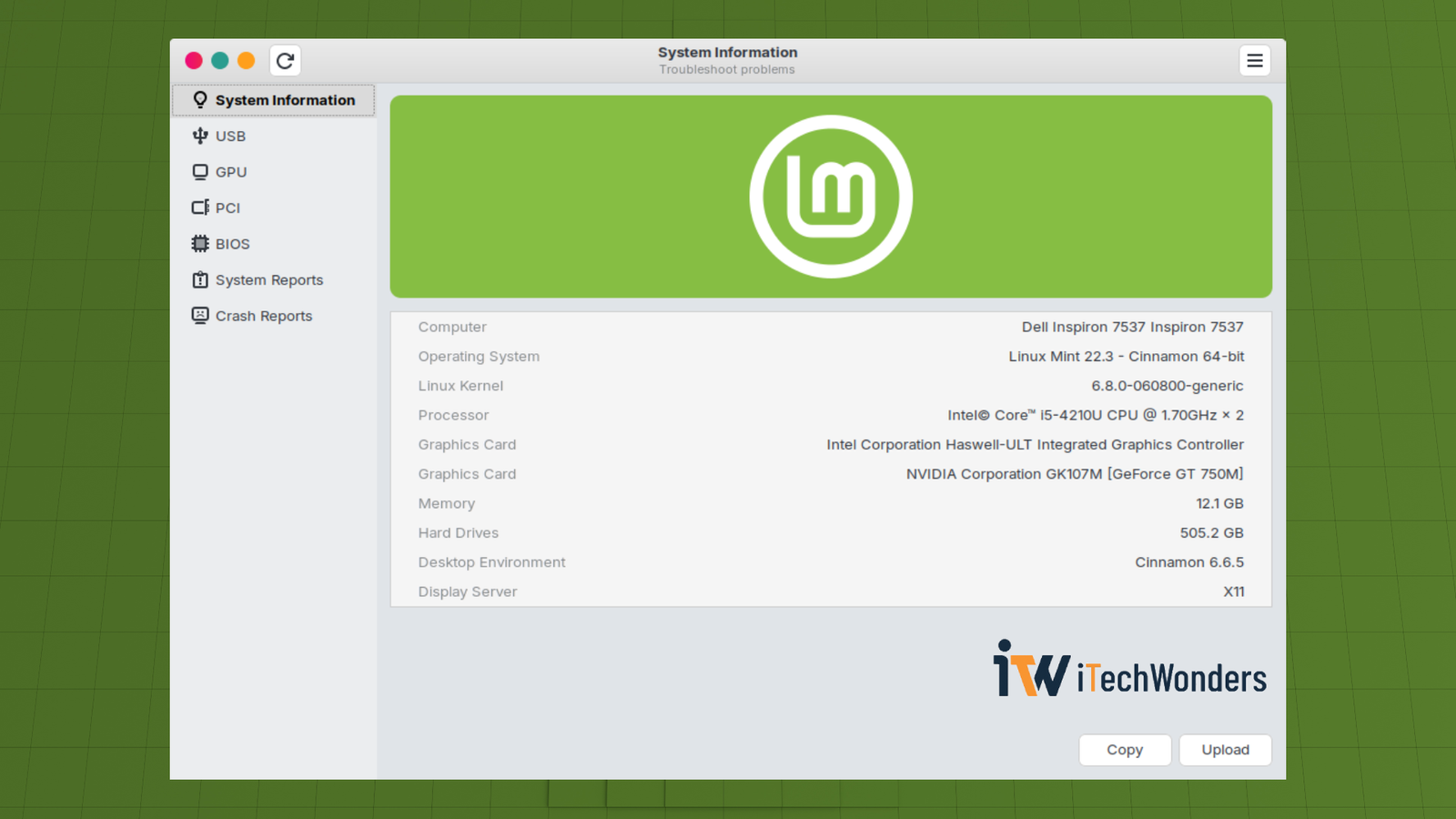
Or, open a Terminal and run echo "$XDG_SESSION_TYPE" to verify the setup.
Why this behavior makes sense:
- Legacy 470 lacks the mature Wayland/GBM support newer proprietary drivers have for recent GPUs, so Wayland acceleration isn’t reliable on old Kepler hardware.
- Even if a Wayland session initializes, applications will often fall back to XWayland or fail to get hardware acceleration, which defeats the whole point of using the proprietary driver.
For an additional check, glxinfo -B can show which GPU is handling OpenGL rendering for that particular process. On hybrid-graphics laptops, remember that having a working NVIDIA driver doesn’t necessarily mean every application is using the discrete GPU.
Wrapping Up: A Realistic Outlook
If you’re dedicated to using older NVIDIA hardware like the GT 750M with Linux gaming and compatibility layers, here’s the honest takeaway:
- Yes — it’s still possible, but only with legacy software and kernels (or by exploring newer community-maintained alternatives).
- Modern distros like Ubuntu 24.04 LTS and Linux Mint have shifted too far forward for legacy drivers to be maintained on all kernels.
- Without sticking to older kernels and older DXVK drivers, you will encounter breakages.
This isn’t a Linux problem so much as it is the inevitable outcome of running hardware that has long since reached end-of-life on the vendor side. The Linux graphics stack continues to evolve, and the Linux ecosystem is adjusting accordingly, with legacy NVIDIA drivers simply no longer part of that future.
The good news? With the right setup (Ubuntu/Mint + kernel 6.8 + 470 driver + DXVK 1.7.3), you can still squeeze meaningful life out of a GT 750M for lightweight gaming, older titles, and compatibility purposes. And with the newer alternatives emerging, there’s even more to explore.
Just don’t expect it to age gracefully, so plan accordingly.
Enjoyed the article?







Thanks for this article! Many folks with older hardware migrate to Linux these days exactly because Windows doesn’t support their hardware anymore ;-]
Important note: high-quality patches that allow to compile v470 drivers even on kernels 7.3-rcX are available in this repo: github.com/joanbm/nvidia-470xx-linux-mainline
These patches are used for example by Arch packages of the v470 driver.
In your experience, is DXVK version 1.7.3 indeed better than 1.10.3? The latter in theory should be much better, hence my question.
Thanks!
Thanks for the detailed comment — and especially for pointing me to the nvidia-470xx-linux-mainline repository. I hadn’t realized the community patches had progressed that far; seeing 470.256.02 kept buildable all the way through current 7.x kernels definitely changes the picture compared with the stock Ubuntu/Mint setup I was working with when I wrote this article.
For some context, I wrote these posts in late January 2026 after spending quite a bit of time testing the GT 750M in my Dell Inspiron 7537. The combination I could repeatedly get stable was kernel 6.8 + the distro-packaged NVIDIA 470.256.02 stack, with Vulkan 1.2.175/OpenGL 4.6 and PRIME set to NVIDIA Performance Mode. In my own testing, kernels newer than 6.8 repeatedly failed during the 470 DKMS build.
So I should clarify one thing in the article: when I described 6.8 as the practical limit, what I really meant was the stock/unpatched NVIDIA 470 path that I had personally tested and could reproduce. I did not mean that R470 was fundamentally incapable of running on newer kernels. Your link makes that distinction especially important, and the wording in the article is admittedly too absolute in that respect.
There has also been a significant Ubuntu packaging change since I wrote it. In June, Noble’s newer 470 package was published as an EOL transitional release rather than the same real 470 stack I had installed in January. More recently, a routine full system upgrade on my machine moved it from 6.8.0-90 to 6.8.0-138, and the previously working proprietary 470 setup stopped functioning. I haven’t yet gone back through the APT/DKMS logs carefully enough to blame the newer kernel itself, but one thing is already clear: running `apt install nvidia-driver-470` today is no longer equivalent to running the same command when I wrote the guide. I’ll be investigating that properly on the same laptop.
As for DXVK 1.7.3 vs 1.10.3: you’re right to question that as well. I don’t have a controlled A/B benchmark proving that 1.7.3 is generally better. It was simply the version I had personally tested most successfully on this particular GT 750M setup, including the games I was using at the time, so I gave it more emphasis than I probably should have.
After re-checking DXVK’s upstream documentation, 1.10.3 is the more sensible general recommendation for proprietary Kepler/R470: it is the legacy release intended for this class of hardware, and its NVIDIA minimum is 470.82, so 470.256.02 satisfies that requirement. I also need to correct another detail in my article: 1.10.3 does have `setup_dxvk.sh`, so that convenience is not unique to 1.7.3 either.
At this point I would treat 1.10.3 as the default choice for Kepler + proprietary 470, with 1.7.3 more as a known-good fallback if a particular game or configuration behaves better with it.
I’ll add a warning to the existing guide and, once I have the laptop in front of me again, go through the old APT/DKMS logs and re-test the current options properly. I may document the newer state in a separate follow-up rather than silently rewriting the original testing context.
Thanks again — this was a genuinely useful correction and update.
Thanks for the reply!
In case you want to try v470 with newer kernels using the patches from the linked repo, DKMS versions 3.4.x have support for patch overriding, which makes it much easier. I’ve provided instructions for Debian on its wiki (https://wiki.debian.org/NvidiaGraphicsDrivers#tesla-kepler-k7.x ), it should be similar on Ubuntu/Mint once you get the newest DKMS.
I’ve recently obtained a 2nd-hand GTX-760 for just a few EUR and was able to run “Elemental Demo” successfully on Debian-13 + kernel-7.3-rc3 + DXVK 1.10.3 + DXVK-NVAPI-0.4 (see https://forums.debian.net/viewtopic.php?p=848596#p848596 ), but Blizzard’s Battle.net refused to start, complaining that some functions are just stubs in the logs 🙁
Cheers! 🙂
Thanks for the follow-up — and nice find on that GTX 760 for just a few euros! ;-]
I had a look at your Debian Wiki guide and noticed your contribution to DKMS itself, too. You’ve clearly spent more time digging into this corner of Linux than I have. I mostly write about things I’ve tested on hardware I own, so I really appreciate you sharing your findings here.
The DKMS 3.4.x patch overrides look like a much cleaner approach. Ubuntu/Mint has the added complication of the now-transitional 470 packages, though, so I’ll first dig through my Dell’s old APT/DKMS logs and try to restore the original R470 setup before experimenting with newer kernels.
Pretty cool that Elemental runs on 7.3-rc3 with DXVK 1.10.3 + DXVK-NVAPI 0.4! Any idea whether Battle.net was hitting Wine stubs or missing NVAPI functions? Curious if it’s more of a launcher issue than a graphics driver limitation.
Once I have the Dell back, I’d like to compare the original 470 setup, community-patched 470, and Nouveau/NVK on my GT 750M. Might even turn the findings into a separate article rather than rewrite the old guide.
Thanks again for taking the time to share all this. Always nice to have someone with your experience around here. Cheers! 🙂
My whole “contribution” to DKMS was literally 2 chars to fix a bug in a now obsolete option: let’s not overprize it ;-]
Regarding failure to start Battle.net:
This is a part I have zero experience with, so maybe you will be able to figure out more: the output was full of repeated errors like the below:
“`
0134:fixme:d3dkmt:NtGdiDdDDIQueryAdapterInfo type 48 not handled.
0134:fixme:setupapi:CM_Get_DevNode_Status_Ex 00503CD8 00503CD4 0x00000002 0x00000000 00000000: stub
0134:fixme:setupapi:CM_Open_DevNode_Key 0x00000002 0x00000001 0x00000000 0x00000001 00503C8C 0x00000001 : stub
0134:fixme:setupapi:CM_Get_Child 00503CE4 0x00000002 0x00000000: stub
0134:fixme:setupapi:CM_Get_DevNode_Registry_Property_ExW 0x00000000 9 00000000 00503E80 00503CEC 0x00000000 00000000: stub
0134:fixme:setupapi:CM_Get_Sibling 00503CE4 0x00000000 0x00000000: stub
0134:fixme:setupapi:CM_Get_DevNode_Status_Ex 00503CD8 00503CD4 0x00000003 0x00000000 00000000: stub
0134:fixme:setupapi:CM_Open_DevNode_Key 0x00000003 0x00000001 0x00000000 0x00000001 00503C8C 0x00000001 : stub
0134:fixme:setupapi:CM_Get_Child 00503CE4 0x00000003 0x00000000: stub
0134:fixme:setupapi:CM_Get_DevNode_Registry_Property_ExW 0x00000000 9 00000000 00503E80 00503CEC 0x00000000 00000000: stub
0134:fixme:setupapi:CM_Get_Sibling 00503CE4 0x00000000 0x00000000: stub
“`
The above sequence was repeated a few hundred times at least and finally at the end there was a SO:
“`
0134:err:virtual:virtual_setup_exception stack overflow 5376 bytes addr 0x76c1a143 stack 0x4ffb00 (0x500000-0x501000-0x600000)
“`
Two details that may bring some clues:
1. I tried installing only DXVK, without DXVK-NVAPI, but the effect was the same.
2. When I installed DXVK 1.10.3 + DXVK-NVAPI 0.4 on another VM with a 3090 and a driver v615, I got the same error again, so it _seems_ that the issue lies in how DXVK-1.10.3 does things.
Cheers!
Hey morgwai,
Sorry for the late reply! I’ve had a few things to take care of outside of this project, and getting my Dell back into working order turned into quite an adventure. Restoring the stock NVIDIA driver took a few hours, followed by nearly a full day of wrestling with Battle.net before I finally got it running. :'(
First, thanks again for sharing your findings on patched R470 and newer kernels. I _still_ haven’t had a chance to test those community patches, but I’ve made some progress with DXVK and Battle.net that might be useful, even though I couldn’t reproduce your exact bug.
My current setup is Ubuntu 24.04, kernel 6.8.0-90, GT 750M 2 GB, the stock distro-packaged NVIDIA 470.256.02 (`470.256.02-0ubuntu0.24.04.1`), Vulkan 1.2.175, Wine Staging 11.18, and DXVK 1.10.3. No community driver patches so far. I also have WineHQ Stable 10.0 installed separately, which still runs my older games, but all my successful Battle.net tests used Wine Staging 11.18.
My initial Battle.net attempt failed because Wine couldn’t load `libvulkan.so.1`, so DXVK couldn’t create a Vulkan instance. After installing the missing 32-bit Vulkan and NVIDIA libraries and starting over with a clean 64-bit Wine prefix, I finally got the launcher working _without_ DXVK. I subsequently added the missing 32-bit OpenGL/EGL libraries to address some remaining graphics-related errors, then installed DXVK 1.10.3.
The launcher now works both with Wine’s built-in Direct3D implementation and **with** DXVK. I can also confirm that DXVK 1.10.3 runs on my GT 750M with R470, consistent with DXVK’s documented minimum NVIDIA driver version of 470.82.
There is one interesting wrinkle. Without DXVK, Battle.net logged some graphics-related warnings, but I didn’t see its Chromium/CEF GPU process unexpectedly exit. With DXVK installed, the launcher repeatedly logged:
`DxgiFactory::CreateSwapChainForComposition: Not implemented`
This was followed by three CEF GPU-process exits with `exit_code=34`. However, the launcher recovered each time and remained usable. I wouldn’t conclude that DXVK is responsible for your stack overflow based on this alone, especially without a more controlled comparison.
I went a step further and installed Hearthstone. It launches successfully and I’ve been able to get into actual gameplay without crashing. The DXVK HUD confirms that it’s using my GT 750M with Vulkan 1.2.175.
A couple of screenshots:
https://imgur.com/a/kXyOyzE
https://imgur.com/a/0r7bdeW
I haven’t encountered the repeated `CM_*` calls or the stack overflow shown in your logs.
Since you also encountered a similar failure on your RTX 3090 VM, I’m hesitant to attribute it specifically to Kepler, patched R470, or your newer kernel. I’m wondering whether the Wine version, its interaction with Battle.net’s CEF components, or the Direct3D configuration might be involved. You may already have seen [WineHQ bug #60353](https://bugs.winehq.org/show_bug.cgi?id=60353), which describes a somewhat similar Battle.net stack overflow, although I can’t tell whether it shares the same cause.
Btw, regarding the repeated `CM_*` calls in your logs, Wine has been improving its Configuration Manager implementation since 11.4, with additional device-property APIs and device-tree relationship handling in subsequent releases. Perhaps a newer Wine build would behave differently (although that doesn’t necessarily explain the stack overflow)?!
So, out of curiosity, which exact Wine version/build were you using? Have you tried launching Battle.net in a clean prefix with Wine’s built-in Direct3D implementation and no DXVK?
I’d still like to experiment with patched R470 and newer kernels when I have more time. For now, though, I’m going to enjoy having a working Blizzard setup for a little while before I break it again! 🙂
Thanks again for all the testing and for sharing your results. Hopefully some of these observations will/could help narrow things down.
It was my Wine version: previously I was using 11.0 stable with just a few patches, I’ve just changed to 11.18 staging (from WineHQ repo) and now I can start Battle.net and play SC2 :))) (decent 70fps at “medium” settings). So to sum it up:
Debian-13, kernel 7.3rc4, NV driver 470 patched, X11, Wine 11.18 staging, DXVK 1.10.3, DXVK-NVAPI 0.4.
It’s strange that the same Wine 11.0 stable build works perfectly fine with newer DXVK versions yet not with 1.10.3, but whatever 😉
Many many thanks for your help!!! :)))